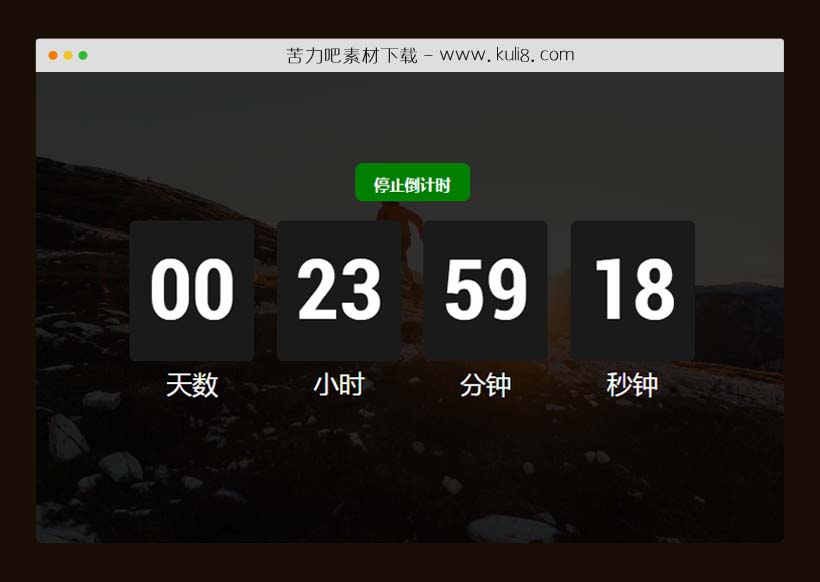

资源描述:一款支持设置日期时间和天数的倒计时插件,可以倒计时到指定的日期,也可以设置天数。全屏响应式设计,很实用。
jquery支持在线自定义日期时间的倒计时插件(共3个文件)
- index.html
使用方法
$(document).ready(function () {

  $(".limit-button").on("click", function () {
    $('.limit').css("display", "none");
    $(".repeat").css("display", "none");
    $("form").append(`<input class="datetime-local" type="datetime-local">`);
    $(".datetime-local").insertBefore(".begin");
    $(".begin").css("display", "flex");
  });
  $(".repeat-button").on("click", function () {
    $('.repeat').css("display", "none");
    $(".limit").css("display", "none");
    $("form").append(`<input class="text" type="text" placeholder="Please type the number of days to countdown.">`);
    $(".text").insertBefore(".begin");
    $(".begin").css("display", "flex");
  });

  $("form").on("submit", function (e) {
    e.preventDefault();

    const typeInput = $("input")[0].type;
    const userInput = $("input").val();
    let seconds;

    if (typeInput == "text") {
      if (userInput == "" || isNaN(userInput)) {
        alert("请输入有效的日期时间");
      } else if (!isNaN(userInput)) {
        seconds = parseInt(userInput) * 86400;
        console.log(seconds);
      }
    } else {
      if (userInput == "") {
        alert("请输入有效的日期时间");
      } else {
        const date = new Date(userInput);
        const now = new Date();
        seconds = parseInt((date.getTime() - now.getTime()) / 1000);
        console.log(seconds);
      }
    }

    if (!seconds || seconds < 0) {
      alert("请输入有效的日期时间");
    } else {
      let days, hours, minutes;

      if (typeInput == "text") {
        days = Math.floor(seconds / (3600 * 24)) - 1;
        hours = 23;
        minutes = 59;
        seconds = 59;
      } else {
        days = Math.floor(seconds / (3600 * 24));
        seconds -= days * 3600 * 24;
        hours = Math.floor(seconds / 3600);
        seconds -= hours * 3600;
        minutes = Math.floor(seconds / 60);
        seconds -= minutes * 60;
      }

      $(`.${typeInput}`).remove();
      $("button.begin").css("display", "none");
      $("form").append(`<button class="stop">停止倒计时</button>`);

      const validationPrint = (timeUnit) => {
        return timeUnit < 10 ? `0${timeUnit}` : timeUnit;
      };

      $("#seconds").text(validationPrint(seconds));
      $("#minutes").text(validationPrint(minutes));
      $("#hours").text(validationPrint(hours));
      $("#days").text(validationPrint(days));

      const changeTimeWithLimit = setInterval(() => {
        seconds -= 1;
        $("#seconds").text(validationPrint(seconds));
        if (seconds === 0 && minutes > 0) {
          seconds = 60;
          minutes -= 1;
          $("#minutes").text(validationPrint(minutes));
        }
        if (seconds === 0 && minutes === 0 && hours > 0) {
          seconds = 60;
          minutes = 60;
          hours -= 1;
          $("#hours").text(validationPrint(hours));
        }
        if (seconds === 0 && minutes === 0 && hours === 0 && days > 0) {
          seconds = 60;
          minutes = 60;
          hours = 24;
          days -= 1;
          $("#days").text(validationPrint(days));
        }
        if (seconds === 0 && minutes === 0 && hours === 0 && days === 0) {
          clearInterval(changeTimeWithLimit);
        }
      }, 1000);

      $(".stop").on("click", function () {
        clearInterval(changeTimeWithLimit);
        console.log(`stop`);
        $(".limit").css("display", "block");
        $(".repeat").css("display", "block");
        $(this).remove();

        $("#seconds").text("00");
        $("#minutes").text("00");
        $("#hours").text("00");
        $("#days").text("00");
      });
    }
  });
});
站长提示:
1. 苦力吧素材官方QQ群:950875342
2. 平台上所有素材资源,需注册登录会员方能正常下载。
3. 会员用户积极反馈网站、素材资源BUG或错误问题,每次奖励2K币。
4. PHP源码类素材,如需协助安装调试,或你有二次开发需求,可联系苦力吧客服。
5. 付费素材资源,需充值后方能下载,如有任何疑问可直接联系苦力吧客服
1. 苦力吧素材官方QQ群:950875342
2. 平台上所有素材资源,需注册登录会员方能正常下载。
3. 会员用户积极反馈网站、素材资源BUG或错误问题,每次奖励2K币。
4. PHP源码类素材,如需协助安装调试,或你有二次开发需求,可联系苦力吧客服。
5. 付费素材资源,需充值后方能下载,如有任何疑问可直接联系苦力吧客服
PREVIOUS:
NEXT:
相关资源 / 日期时间
javascript基于SVG创建的复古的摇摆时钟特效代码
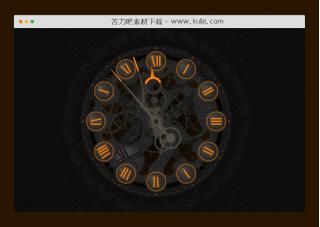
此特效采用了SVG、CSS和JavaScript生成的游戏时钟效果,它创建了一个带有动画指针的钟面,指针根据当前时间移动。JavaScript设置时间并触发蜂鸣声。CSS处理时钟视觉效果的动画。
日期时间
😀
- 😀
- 😊
- 😂
- 😍
- 😑
- 😷
- 😵
- 😛
- 😣
- 😱
- 😋
- 😎
- 😵
- 😕
- 😶
- 😚
- 😜
- 😭
发表评论